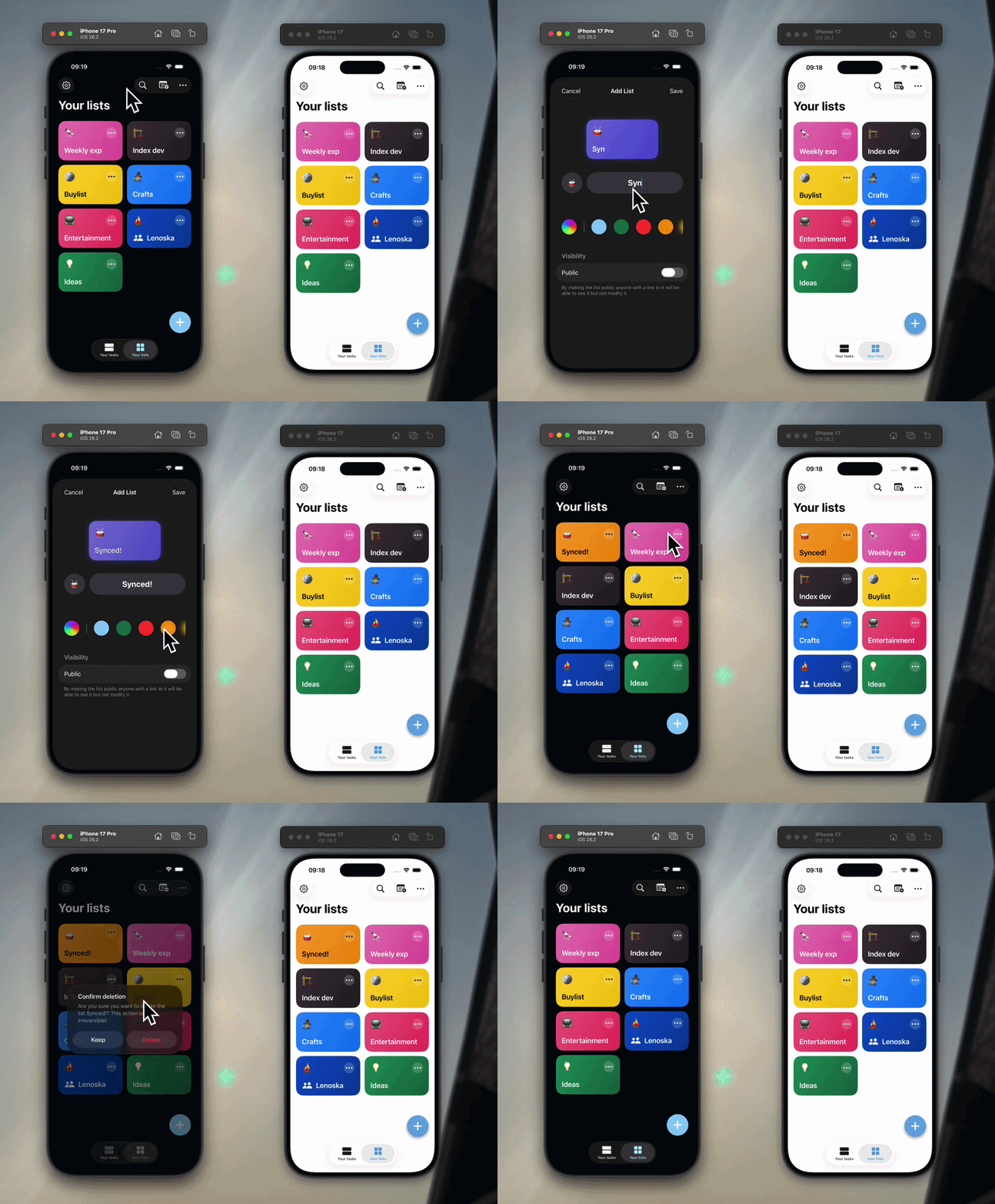
In my Index list/tasks app I wanted to have real-time data in some scenarios:
- cross platform app usage: if the user updates some data from the browser I want the mobile app to reflect the changes in real time
- collaborative features: users can share lists with others and see their update to it in real time without having to refresh or close and re-open the app
- additional security: if a user mistakenly reveals his password he can reset it and all auth sessions for his account get invalidated, logging out the user in real time on all devices
This was a perfect case for websockets.
Whenever the user logs in into the app, he connects to the websocket server and starts reacting to events received by the server.
distributed scenario
The tricky part is that I built my todo app with scale in mind, expecting trillions of users (right now it's just around 10), so I have it deployed on Kubernetes.
On kubernetes though my backend API runs on multiple pods, just to be safe and to have no downtime when rolling out updates.
The kubernetes internal load balancer randomly routes traffic to one of those pods when it receives a request, and in the case of websocket connections it chooses a random pod to establish the connection with the user device.
So let's say user has three devices phone, laptop and desktop, here is what could happen:
                      loadbalancer
┌───────┐               ┌──────┐
│ phone ┼───────────────┼─ ─ ─ ┼──────────────┐
└───────┘               │      │           ┌──▼──┐
                        │      │     ┌────►│pod_0│
                        │      │     │     └─────┘
┌────────┐              │      │     │
│ laptop ├──────────────┼─ ─ ─ ┼─────┘
└────────┘              │      │           ┌─────┐
                        │      │           │pod_1│
                        │      │           └──▲──┘
┌─────────┐             │      │              │
│ desktop ├─────────────┼─ ─ ─ ┼──────────────┘
└─────────┘             └──────┘
so you have two devices with an established websocket connection to pod_0 and one to pod_1, now:
- user performs action on phone
pod_0receives the request and runs calculations- sends websocket event to user connected devices:
phone,laptop
|==>desktopwill never know abou that event because it's not connected to the same pod
there are two ways to fix this situation:
a) connect the same user always to the same pod
b) add some sort of global websocket events manager to synchronize all pods on the events to send
option a in my case doesn't hold because of the collaborative list feature, two different users might need to receive the same events because they have a shared list together + it is very impractical to make user a user gets always connected to the same pod.
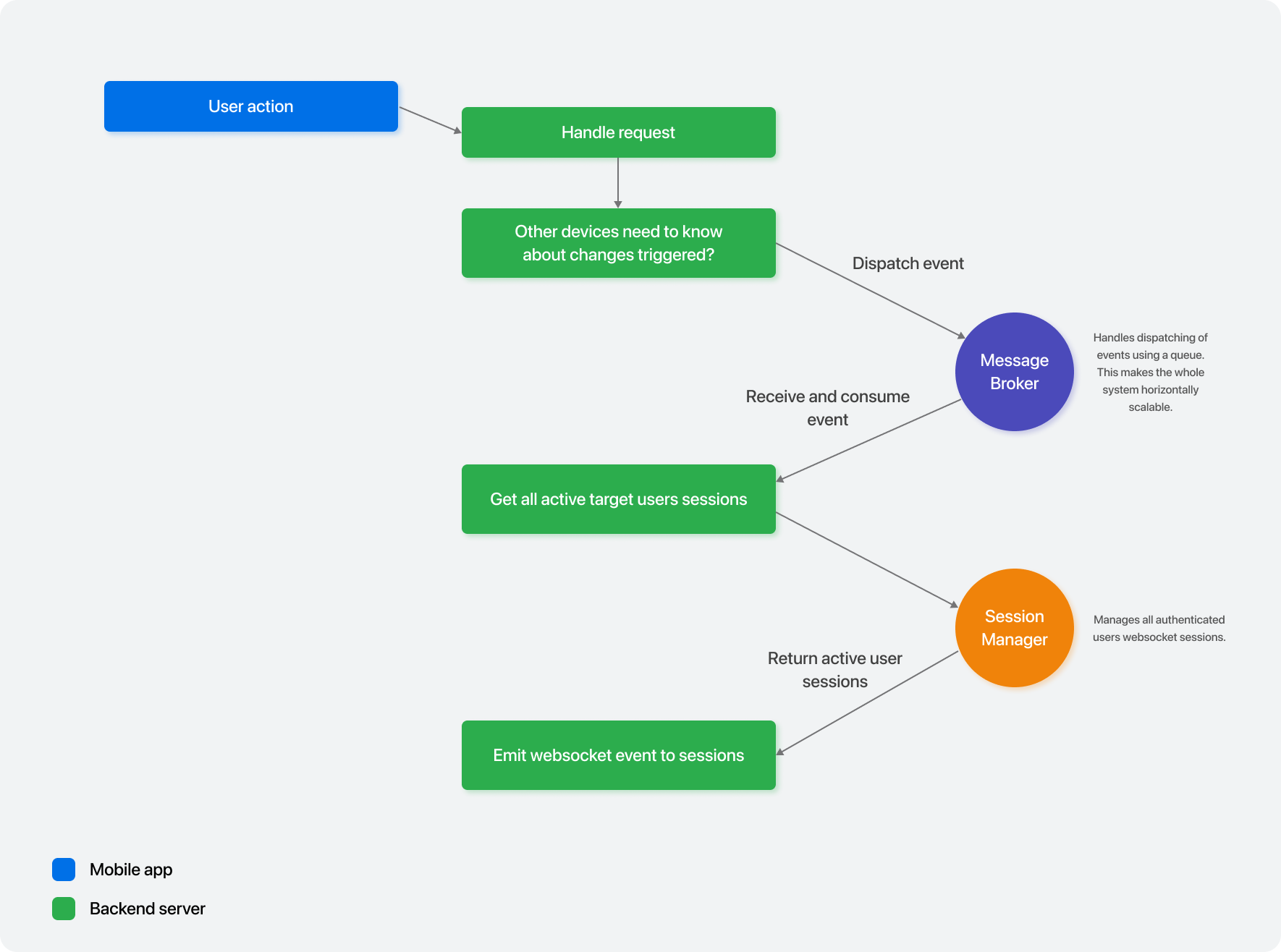
the solution I came up with is using a message broker, RabbitMQ in my case, to centralize all the events between pods.
Here is the high level overview of my solution:
storing the websocket sessions
Let's start from the root, let's configure the websocket plugin for the Ktor server:
fun Application.configureWebsockets() {
    install(WebSockets) {
        pingPeriod = 15.seconds
        timeout = 15.seconds
        maxFrameSize = Long.MAX_VALUE
        masking = ApiConfig.webSocketMasking

        contentConverter = KotlinxWebsocketSerializationConverter(
            Json {
                serializersModule = IdKotlinXSerializationModule
                ignoreUnknownKeys = true
                encodeDefaults = true
            }
        )
    }
}
you can read about how I use env variables via
ApiConfigobject in this article, while the serializers module you see allows me to use typed IDs which I described in this guide!
now once the user gets a session token, he can call the /ws endpoint to connect to the websocket:
fun Route.websocketRoutes() {
    val websocketConnectionsManager by inject<WebsocketConnectionsManager>()

    authenticate(AuthenticationMethods.USER_SESSION_AUTH) {
        webSocket("/ws") {
            val session = call.principal<UserAuthSessionData>()

            // Save the ws connection
            val wsConnection = WebsocketConnection(
                sessionId = session.id,
                userId = session.userId,
                connection = this
            )

            websocketConnectionsManager.handle(wsConnection)

            // Keep connection open until someone closes it
            try {
                for (frame in incoming) {
                    // Just need to keep this open
                }
            } catch (e: Exception) {
                log.warn { "Websocket exception $e" }
            } finally {
                websocketConnectionsManager.removeConnection(wsConnection)
            }
        }
    }
}
what we do here is important, as we store everything needed to communicate to this websocket session in the WebsocketConnection class.
It holds a reference to the connection class, which is avaialbe using this inside the websocket route, that can be used to send data.
we then store this websocket connection data in our WebsocketConnectionsManager (I use Koin to inject it), and then keep the connection open by listening to incoming frames.
let's take a look at the connections manager:
class WebsocketConnectionsManager : IClosableComponent {
    private val connections = Collections.synchronizedSet<WebsocketConnection>(LinkedHashSet())

    fun handle(websocketConnection: WebsocketConnection) {
        // Max one connection per session
        connections.removeAll { it.sessionId == websocketConnection.sessionId }

        connections += websocketConnection
        log.debug { "Handling new websocket connection: $websocketConnection" }
    }

    fun getConnectionsOfUser(userId: IxId<UserData>): List<WebsocketConnection> {
        return connections.filter { it.userId == userId }
    }

    fun removeConnection(websocketConnection: WebsocketConnection) {
        connections.remove(websocketConnection)
        log.debug { "Not handling the following websocket connection anymore: $websocketConnection" }
    }

    suspend fun closeConnectionOfSession(id: IxId<UserAuthSessionData>) {
        connections.find { it.sessionId == id }
            ?.also {
                try {
                    it.connection.close(CloseReason(CloseReason.Codes.NORMAL, "Session closed"))
                } catch (_: Exception) {}
                connections.remove(it)
                log.debug { "Closed websocket connection: $it" }
            }
    }

    suspend fun closeAllSessionsOfUser(userId: IxId<UserData>) {
        connections
            .filter { it.userId == userId }
            .onEach {
                try {
                    it.connection.close(
                        CloseReason(
                            CloseReason.Codes.CANNOT_ACCEPT,
                            "Session closed, not because of logout"
                        )
                    )
                } catch (_: Exception) {}
            }
            .also {
                if (it.isNotEmpty())
                    connections.removeAll(it.toSet())

                log.debug { "Closed all websocket sessions of user with id $userId" }
            }
    }

    /**
     * Closes **ALL** websocket connections
     */
    override suspend fun close() {
        connections.onEach {
            try {
                it.connection.close(
                    CloseReason(
                        CloseReason.Codes.SERVICE_RESTART,
                        "Server shutdown"
                    )
                )
  `          } catch (_: Exception) {}
        }
        connections.clear()
        log.debug { "Closed all websocket sessions" }
    }
}
to sum up what this code does, it simply stored our connection data in a thread safe Set, and then exposes methods to retrieve connections data based on the session that we want or the user.
this way we can get all the active websocket connections of a specific user.
you can also see this class conforms to IClosableComponent and implements the close() function: that gets called when the API server is shutdown so we gracefully close all sessions before shuttind down the API server.
defining our websocket payloads
ok so now we have an easy way to store and retrieve websocket sessions, let's talk about events instead.
the goal is that whenever we have an event that we want to emit to the user, we throw it at the message broker, and all pods listen to events thrown at the message broker and decide whether they need to react and handle that event or if they can ignore it:
                  message
                  broker
     new event  ┌────────────┐
   ┌───────────►│   events   │
┌──┼──┐         │  exchange  │
│pod_0│◄───┐q1  │  ────────  │
└─────┘    │    │  ────────  │
           ├────┼─ ────────  │
           │    │            │
┌─────┐    │q2  │            │
│pod_1│◄───┘    │            │
└─────┘         │            │
                │            │
                └────────────┘
let's define the data that we are gonna send to our message broker:
/**
 * Represents a websocket event that should be sent to a user
 *
 * @param fromSessionId the user auth session that triggered this event
 * @param fromUserId the id of the user that triggered this event
 * @param targetUsers the users that should receive this event
 * @param type
 * @param inclusive indicates whether the event should be emitted also to the auth session that generated it
 * @param content polymorphic data depending on the [type]
 */
@Serializable
data class WebsocketEventData(
    @Contextual val fromSessionId: IxId<UserAuthSessionData>?,
    @Contextual val fromUserId: IxId<UserData>?,
    val targetUsers: Set<@Contextual IxId<UserData>>,
    val type: WebsocketEventType,
    val inclusive: Boolean,
    val content: WebsocketEventContent
)
the type being just an enum that can be used by the API clients to have an overview of the event data:
enum class WebsocketEventType {
    USER_AUTH_SESSIONS_INVALIDATED,
    USER_UPDATED,

    ITEM_CREATED,
    ITEM_UPDATED,
    ...
}
while content holds the actual information that we want clients to receive, it's cool because it uses polymorphic serialization:
@Serializable
sealed class WebsocketEventContent {
    @Serializable
    @SerialName("USER_UPDATE")
    data class UserUpdateEventContent(
        val user: UserData.UserResponseDto
    ) : WebsocketEventContent()

    @Serializable
    @SerialName("ITEM_CREATE_OR_UPDATE")
    data class ItemCreateOrUpdateEventContent(
        val item: ItemData
    ) : WebsocketEventContent()

    ...
}
when we serialize this sealed class, the kotlinx-serialization library adds a type field which holds the @SerialName as the value, easier to explain with code:
fun main() {
    val data: WebsocketEventContent = ItemCreateOrUpdateEventContent(ItemData.mock())
    val serialized = ObjectMapper().encode(data)
    println(serialized)
}
will print:
{ "type": "ITEM_CREATE_OR_UPDATE", "item": {...} }
this will not be too useful for us in the backend since we don't care about the data, but it's really useful in the clients to decide which type / class to deserialize with.
here is an example using Swift from the iOS app:
enum WebsocketEventContent: Decodable {
    case userUpdate(UserUpdateEventContent)
    case itemCreateOrUpdate(ItemCreateOrUpdateEventContent)
    ...

    private enum CodingKeys: String, CodingKey {
        case type
    }

    init(from decoder: Decoder) throws {
        let container = try decoder.singleValueContainer()
        let contentContainer = try decoder.container(keyedBy: CodingKeys.self)
        let type = try contentContainer.decode(String.self, forKey: .type)

        switch type {
        case "USER_UPDATE":
            let payload = try container.decode(UserUpdateEventContent.self)
            self = .userUpdate(payload)
        case "ITEM_CREATE_OR_UPDATE":
            let payload = try container.decode(ItemCreateOrUpdateEventContent.self)
            self = .itemCreateOrUpdate(payload)
        ...
        default:
            throw DecodingError.dataCorruptedError(
                forKey: .type,
                in: contentContainer,
                debugDescription: "Unknown event content type: \(type)"
            )
        }
    }

    struct UserUpdateEventContent: Codable {
        let user: NetworkUser
    }

    ...
}
if I instead leavereged Kotlin Multiplatform to create a Swift compatible SDK, it would have been as simply as copying the sealed class from the backend code.
when decoding using kotlinx-serialization and sealed classes, the type field gets already handled for you and you don't need to do anything.
sending events to the message broker
got the data defined, let's submit it to RabbitMQ.
if you are not comfortable with how RabbitMQ works, you simply define an exchange and the queues.
- the exchange is like a router, it receives messages and decides which queue should receive them based on some rules
- a queue is a message storage that also acts like a category that you define for your messages, so that you can then react to messages of a specific category instead of all messages, by using queues.
in our case we do it a bit differently, we use the exchange as the category, and then set it up as FANOUT so it forwards messages to all queues bound to it.
we declare one queue per pod, that gets deleted when the pod goes offline.
class WebsocketEventsQueueManager(
    rabbitMqClient: RabbitMqClient,
    private val objectMapper: ObjectMapper
) {
    private var websocketEventChannel: Channel = rabbitMqClient.connection.createChannel()
    private val podQueueName: String

    init {
        websocketEventChannel.exchangeDeclare(
            /* exchange = */ RabbitMQConfig.websocketExchangeName,
            /* type = */ BuiltinExchangeType.FANOUT,
            /* durable = */ false
        )

        val declaredQueue = websocketEventChannel.queueDeclare(
            /* queue = */ "", // auto generates a unique name
            /* durable = */ false, // doesn't survive broker restarts
            /* exclusive = */ true, // only this connection uses it
            /* autoDelete = */ true, // delete when last consumer unsubscribes
            /* arguments = */ null
        )
        podQueueName = declaredQueue.queue

        websocketEventChannel.queueBind(
            /* queue = */ podQueueName,
            /* exchange = */ RabbitMQConfig.websocketExchangeName,
            /* routingKey = */ ""
        )
    }

    fun enqueue(websocketEventData: WebsocketEventData) {
        log.debug { "Publishing RabbitMQ websocket event: $websocketEventData" }

        websocketEventChannel.basicPublish(
            /* exchange = */ RabbitMQConfig.websocketExchangeName,
            /* routingKey = */ "",
            /* props = */ AMQP.BasicProperties(),
            /* body = */ objectMapper.encodeToByteArray(websocketEventData)
        )
    }
}
now let's actually see an example of when this gets used in our API endpoints.
I declared an helper extension function for the Ktor routing context:
fun RoutingContext.emitWebsocketEventForUsers(
    websocketEventManager: WebsocketEventManager,
    type: WebsocketEventType,
    content: WebsocketEventContent,
    users: Set<IxId<UserData>>,
    includeCurrentSession: Boolean = false
) {
    val authSession = this.call.principal<UserAuthSessionData>()

    try {
        // this simply calls WebsocketEventsQueueManager.enqueue() under the hood,
        // the class is showcased later on in this blog post
        websocketEventManager.emit(
            fromSessionId = authSession?.id,
            fromUserId = authSession?.userId,
            eventType = type,
            eventData = content,
            users = users,
            includeCurrentSession = includeCurrentSession
        )
    } catch (e: Exception) {
        log.error(e) { "Error emitting websocket event: type $type, content $content" }
    }
}
then when the user calls the API to create a new item in a list (with POST /lists/{id}/items):
post<ListsRoute.ListRoute.ItemsRoute> {
    val userId = userIdFromSessionOrThrow()

    val list = ListAuthorizationUseCase.getListIfAuthorized(
        listId = it.parent.list_id,
        userId = userId,
        authorizationLevel = ListAuthorizationLevel.EDITOR
    ) ?: return@post call.respond(HttpStatusCode.NotFound)

    val newItem = call.receive<ItemData.ItemCreateRequestData>()
    val item = itemDao.create(userId, it.parent.list_id, newItem)

    // respond with status code 200 and the created item
    call.respond(item)

    // notify all users that have access to that list about the new item
    emitWebsocketEventForUsers(
        websocketEventManager = websocketEventManager,
        type = WebsocketEventType.ITEM_CREATED,
        content = WebsocketEventContent.ItemCreateOrUpdateEventContent(item),
        users = list.getUsersWithAccess()
    )
    ...
}
reacting to message broker websocket events
let's close the circle, let's react to the messages coming from RabbitMQ and send websocket events to the end users.
first we need to listen to the queue using the RabbitMQ client:
// same class that we used for submitting events
class WebsocketEventsQueueManager(
...

    // run the listener in a coroutine scope so that it's async
    private val consumerCoroutineScope = CoroutineScope(Dispatchers.IO + SupervisorJob())

    fun startListeningAndConsumingEvents(consumer: suspend (body: ByteArray?) -> Unit) {
        val websocketEventConsumer = object : DefaultConsumer(websocketEventChannel) {
            @Throws(IOException::class)
            override fun handleDelivery(
                consumerTag: String?,
                envelope: Envelope,
                properties: AMQP.BasicProperties,
                body: ByteArray?
            ) {
                consumerCoroutineScope.launch {
                    consumer(body)
                }
            }
        }

        websocketEventChannel.basicConsume(
            /* queue = */ podQueueName,
            /* autoAck = */ true,
            /* callback = */ websocketEventConsumer
        )

        log.info { "Listening to RabbitMq websockets queue messages! "}
    }
what we are left to do is submit a websocket event when we receive one from the queue, if we have any user connected to the pod that needs to receive that event.
for this I have a WebsocketEventManager class, which ties up everything together, our WebsocketConnectionsManager and WebsocketEventsQueueManager nicely:
class WebsocketEventManager(
    private val websocketEventsQueueManager: WebsocketEventsQueueManager,
    private val websocketConnectionsManager: WebsocketConnectionsManager,
    private val objectMapper: ObjectMapper
) {
    init {
        websocketEventsQueueManager.startListeningAndConsumingEvents { body ->
            if (body == null) {
                log.error { "Missing rabbitmq message body in websocket queue" }
            } else {
                val websocketEventData: WebsocketEventData = objectMapper.decodeFromByteArray(body)

                log.debug { "Consuming rabbitMq websocket event: $websocketEventData" }

                consume(websocketEventData)
            }
        }
    }

    private suspend fun consume(websocketEventData: WebsocketEventData) {
        if (websocketEventData.type == WebsocketEventType.USER_AUTH_SESSIONS_INVALIDATED) {
            if (websocketEventData.fromUserId == null) {
                throw IllegalArgumentException("Emitted a USER_AUTH_SESSIONS_INVALIDATED websocket event but the event payload FROM_USER_ID property is null")
            } else {
                websocketConnectionsManager.closeAllSessionsOfUser(websocketEventData.fromUserId)
            }
            return
        }

        val targetWebsocketConnections  = websocketEventData.targetUsers.map {
            websocketConnectionsManager.getConnectionsOfUser(it)
        }.flatten().toMutableSet()

        if (!websocketEventData.inclusive) {
            targetWebsocketConnections.removeIf { it.sessionId == websocketEventData.fromSessionId }
        }

        targetWebsocketConnections.forEach {
            try {
                it.connection.sendSerialized(websocketEventData.sanitize())
                log.debug { "Sent websocket event to websocket connection: $it" }
            } catch (e: IllegalStateException) {
                // Websocket connection is closed already
                websocketConnectionsManager.removeConnection(it)
            } catch (e: WebsocketConverterNotFoundException) {
                log.error(e) { "Could not find websocket converter for serialization" }
            }
        }
    }
    ...
}
this class also has a simple wrapper method to enqueue a message in RabbitMQ, so that the RabbitMQ class is fully hidden from the developer and this class acts as a centralize way to manage websocket messages.
the helper method is:
class WebsocketEventManager(
...

    /**
     * Emits a websocket event to all [users]
     *
     * @param fromSessionId null if websocket event was not triggered by a logged in user
     * @param fromUserId null if websocket event was not triggered by a logged in user
     * @param eventType
     * @param eventData
     * @param users the users to emit the event to if they have an active websocket connection
     * @param includeCurrentSession whether to emit the event to the session of the user who triggered the event
     */
    fun emit(
        fromSessionId: IxId<UserAuthSessionData>?,
        fromUserId: IxId<UserData>?,
        eventType: WebsocketEventType,
        eventData: WebsocketEventContent,
        users: Set<IxId<UserData>>,
        includeCurrentSession: Boolean
    ) {
        val websocketEventData = WebsocketEventData(
            fromSessionId = fromSessionId,
            fromUserId = fromUserId,
            targetUsers = users,
            type = eventType,
            inclusive = includeCurrentSession,
            content = eventData
        )

        websocketEventsQueueManager.enqueue(websocketEventData)
    }
}
showcase time!
here is an example to see how fast changes are reacted to from one device to another, almost instant!