Not so much time ago, Jetbrains announced an interesting contest for students. The goal was to build a Kotlin multiplatform app and the winners would receive a trip to KotlinConf 2024!
I thought that was a fantastic opportunity so here is how my attempt at it went.
The idea
I was getting eye strain for coding too much late at night (I later found out I just needed glasses instead), so I looked up some desktop break timer apps and found that most of them were made in Electron, and since my laptop was pretty old I couldn’t afford having a whole Electron app running in the background all the time.
So here comes my idea: ZenBreak, a break timer app.
I basically wanted to create a similar app to BreakTimer but native, yet multiplatform!
The requirements were:
- having a settings window to edit the various settings, like frequency of the breaks, duration of them, the style of the break popup, etc…
- having a popup window, that would show when the break starts
The building process
I started off looking trough some examples and tutorials from the Compose multiplatform library, choose a template, opened AndroidStudio and started coding!
I created a shared-core module which would contain my shared logic of the app between all platforms. The most useful libraries that I used there were koin for DI and multiplatform-settings for storing user settings.
I initially thought I would be able to build everything with compose multiplatform and started working on the desktop app with that, but after playing around with window management I figured out it wasn’t powerful enough to make great looking popups on macOS.
So, I split the shared-core module into multiple ones:
- shared-core: shared logic of the app
- shared-compose-core: shared foundations for the compose ui
- shared-compose-settings: compose ui for managing the app settings
- shared-compose-popup: compose ui for the break window that pops up when a break starts
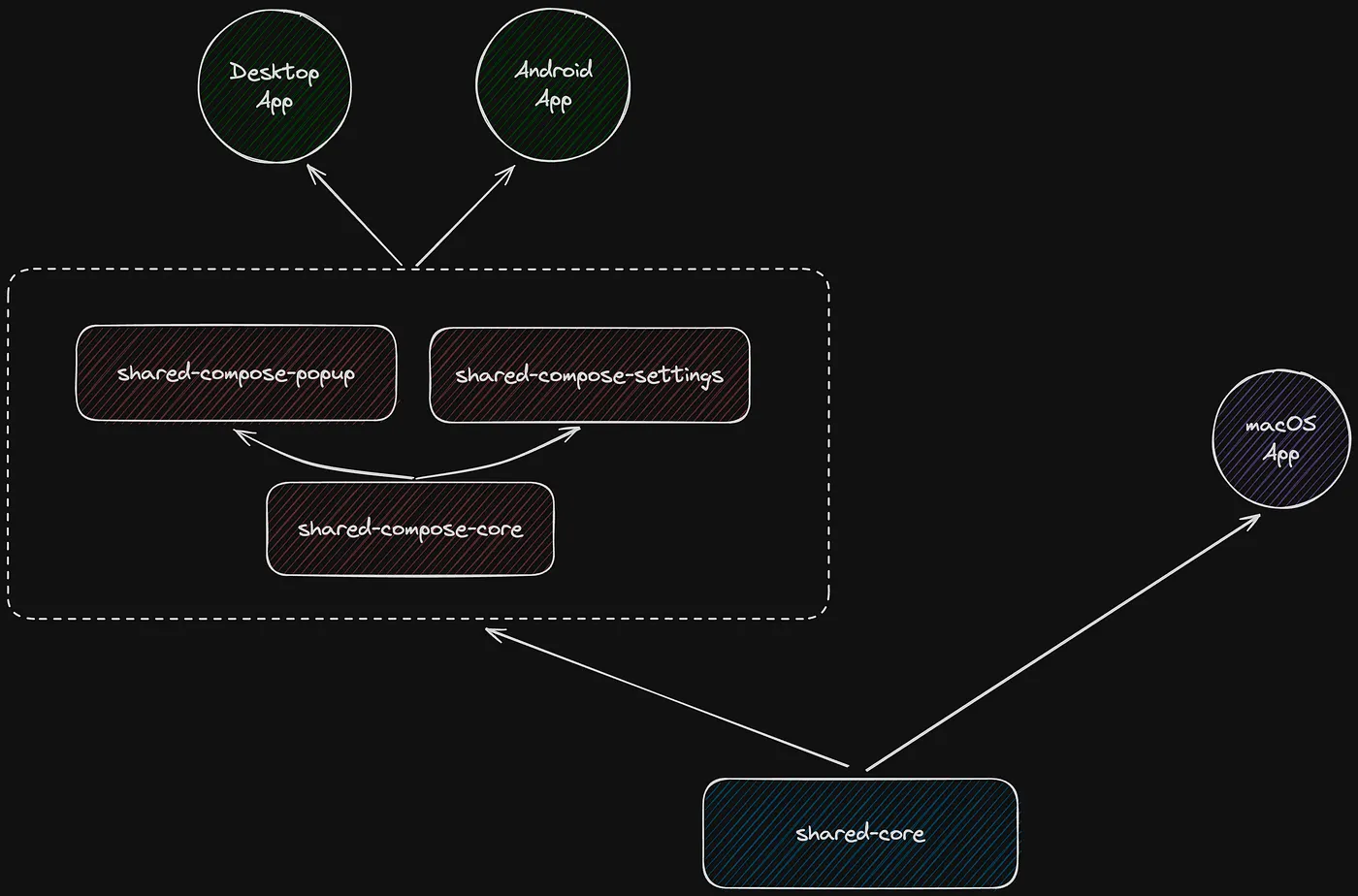
I created those separate modules to make it future proof in case I wanted to build an Android app too
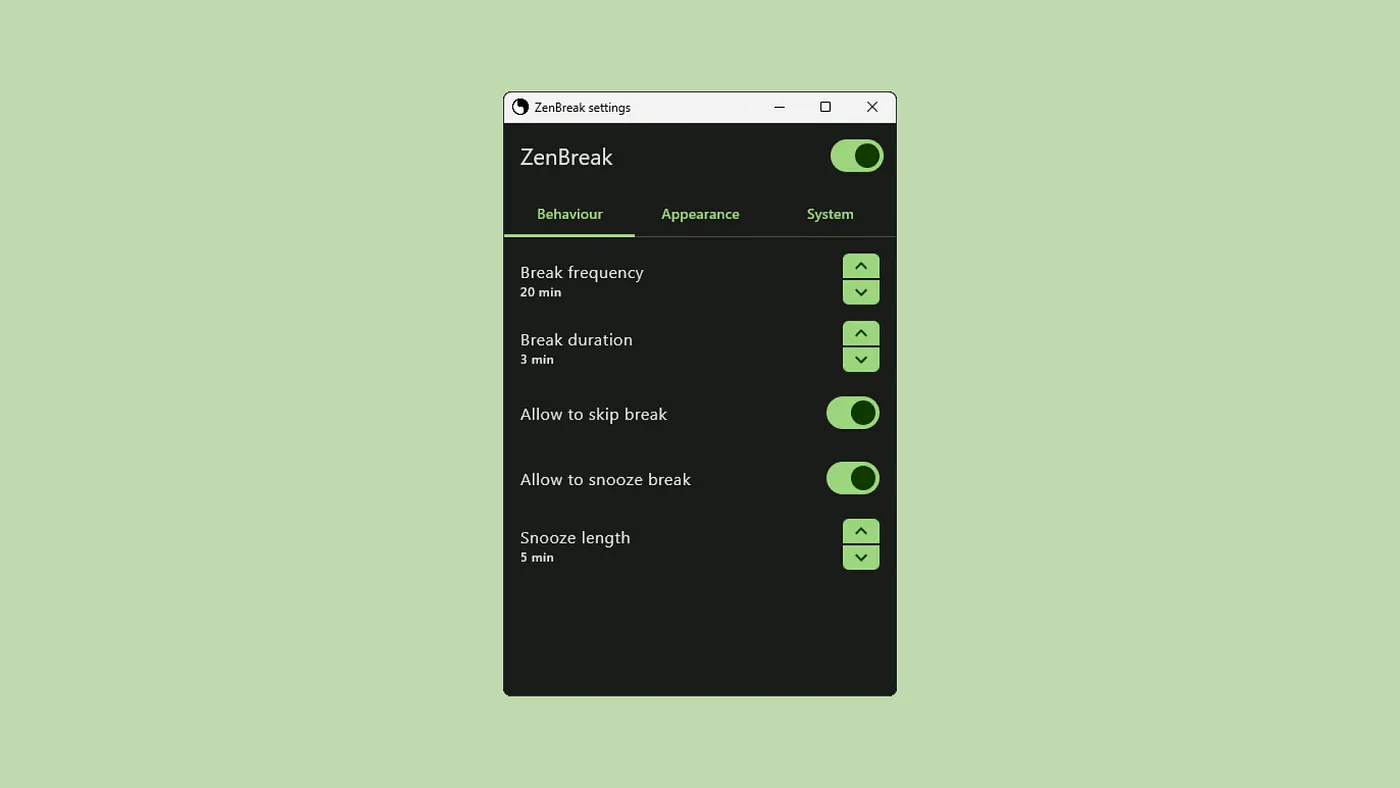
The desktop app now worked perfectly fine, at the end it just consisted of a few dependencies in the Gradle files to make it work.
Here is how one of its windows looked:
Building the macOS app
It was time for the trickier part, using the Kotlin shared-core module from a Swift project.
I played around with it by building everything locally and developed the ui for the macOS app. One repo that helped me a lot was TomatoBar, an open source pomodoro timer app for macOS only, since I had no experience with Swift before this, it really got me going faster when doing window managment logic.
The first issue I encountered was consuming kotlin state flows from swift, and after reading a bunch of articles from John O’Reilly (thank you for those!) I ended up using KMP-NativeCoroutines
A thing I had to do unfortunately was to create swift bindings myself for the various settings of the app, since I didn’t find a more concise way to achieve settings binding for the ui
private var message: Binding<String> { Binding(
    get: {
        viewModel.settings.breakMessage
    },
    set: { message in
        viewModel.setBreakMessage(message: message)
    }
)}
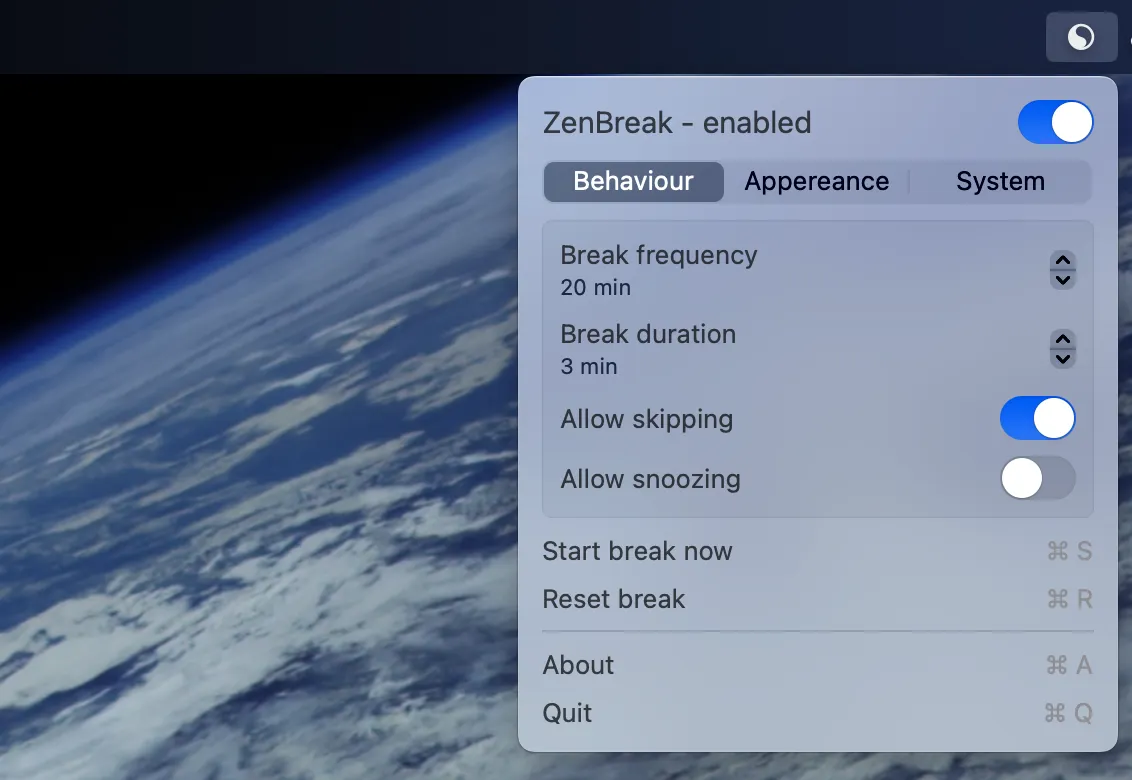
Building the user interface with SwiftUI has really been a pleasure though and I finished it pretty quickly, here is what it looked like:
CICD
This was the hardest part of building the app, and it’s still incomplete.
The most important thing was being able to publish the shared-core module as a swift package, and I did so using KMMBridge.
Basically I added the following in the build.gradle.kts file of the module after adding the dependency:
addGithubPackagesRepository()
kmmbridge {
    frameworkName.set("ZenBreakCoreKit")
    spm()
    mavenPublishArtifacts()
}
And then created a GitHub action that I could manually trigger to publish the Swift package on GitHub Packages:
name: Release ZenBreakCoreKit
on: [workflow_dispatch]
jobs:
  call-kmmbridge-publish:
    permissions:
      contents: write
      packages: write
    uses: touchlab/KMMBridgeGithubWorkflow/.github/workflows/faktorybuildautoversion.yml@v1.0
    with:
      jvmVersion: 17
      versionBaseProperty: LIBRARY_VERSION
Touchlab really made a great tool, and thanks to that it was really easy in XCode to import that published package into the project!
After that, I played around a lot, like… a lot, with fastlane to get a great publishing CICD for the desktop and macOS apps, but I couldn’t figure it out and didn’t have more time to spend on that, so that’s missing still!
Publishing
It was finally time to publish the app, for the mac app it was pretty easy, I bought the Apple Developer licence, got onto the dashboard, created the store page, uploaded the app and after a few days it was already available in the App Store!
For the desktop one, things were a little harder, as I wanted the app to be signed so that users didn’t get that annoying popup when installing telling them that the app was dangerous…
I found out that the Microsoft Store automatically signed your app and so I went with that, I’ve setup Conveyor which saved my life for packaging the app properly with a simple gradle dependency and a config file, and then hit upload on the Microsoft Store.
That took much more time and received many rejections, unexpected ones like not being able to publish the app in China ’cause my support link for the app was a Discord server, which is banned in that country… yikes
But at the end the app got approved, wrote a small website using SvelteKit for the first time (let’s say I took some inspiration from the Jetbrains websites haha) did a few Reddit and X posts and… that was it!
I built my first multiplatform desktop menu bar app using Kotlin multiplatform, and it felt like a big achievement!
Considerations
It has been a bit though building the app with Kotlin multiplatform, not because of the tooling or libraries, but because of the documentation. Docs were basically missing and that made me spend a lot of time figuring things out by myself, attempt after attempt, and lets say that having a kotlin module taking 15 minutes to compile to native didn’t really help xD but I blame my old laptop for that :/
I do love the modularity that kotlin offers though, being able to build exactly what you need in Kotlin and leaving the rest to native frameworks. That’s what makes Kotlin multiplatform shine to me!
If you are interested in the app you can find it on zenbreak.app, or on GitHub.
Unfortunately I wont be able to participate to the contest prize because Italy is excluded as a country :/
I hope that in a future contest this will not be the case anymore as I would have loved to meet other Kotlin fans from all around the world!